Telegram auto reply with AI: set up a business chatbot that sounds like you
Last verified November 8, 2026Before you start
You need your Telegram account connected to CreatorInbox through your own bot. It takes about 5 minutes and no Telegram Premium: see Get started. The AI is part of the Pro ($29/month) and Studio ($99/month) plans.
The first time you open AI, the page shows a short list of three steps.
1. Choose your agent
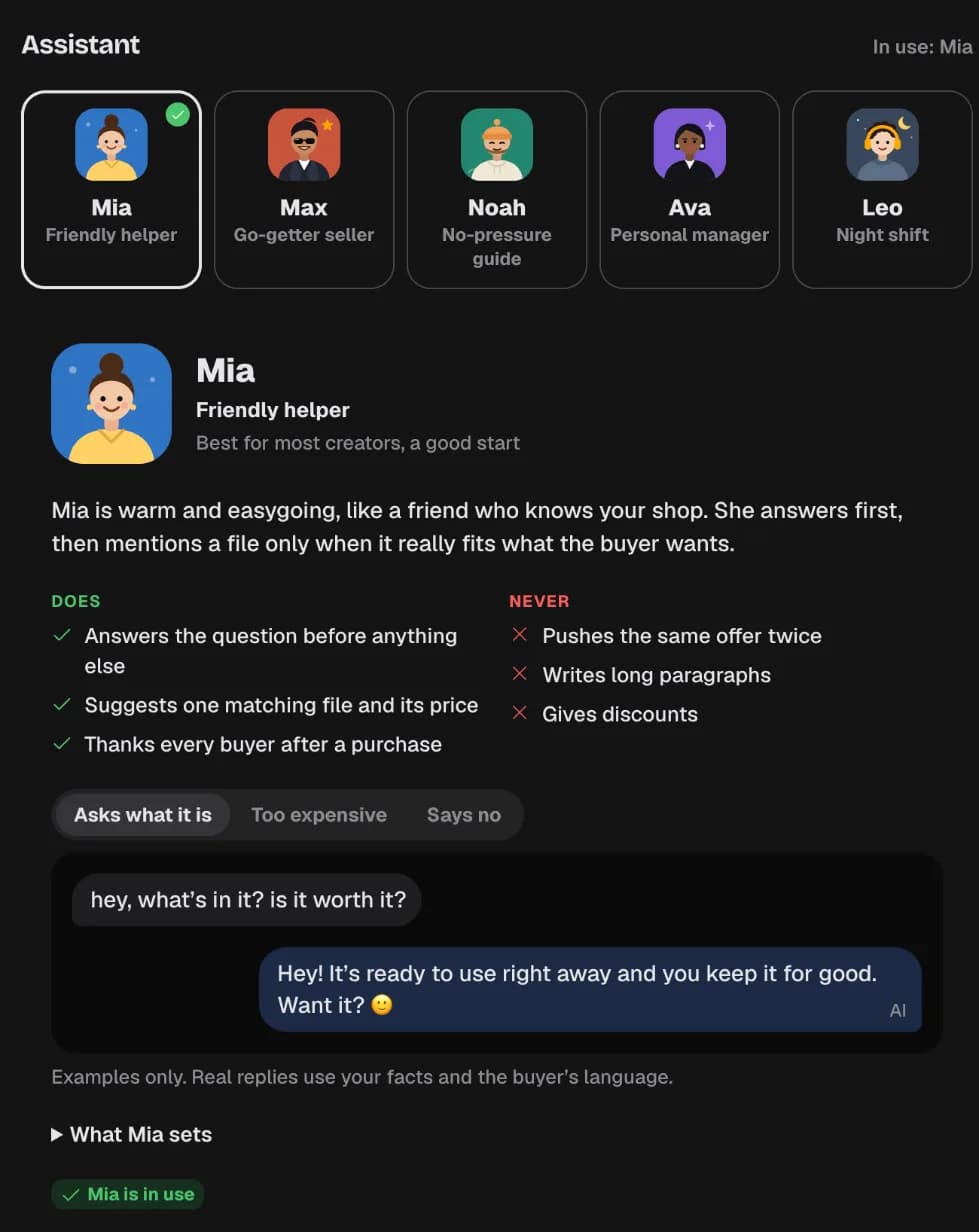
Pick a ready agent as a starting point. Each card shows how that agent answers the same buyer, so you can compare before choosing:
- Mia, support agent
- Max, sales closer
- Noah, gentle companion
- Ava, fan manager
- Leo, night shift
- Or Custom agent, a blank page you write yourself.
You can change every word later. Press Continue.
2. Tell it what’s true about you
Write a few plain facts about you and what you sell, for example: “Photo sets come from our studio and beach shoots. A new set arrives every Friday. Files arrive right after payment.” The AI only says what’s written here, so add the details buyers ask about.
3. Pick a profile and turn on Drafts
Choose the Telegram profile the AI should work in. In Drafts, the AI writes each reply and you tap Send, edit it, or dismiss it. Nothing goes out without you.
Tick the permission that lets the AI read one chat at a time to write replies. It’s never used for training or ads, and you can switch it off any time. Then press Turn on Drafts. The steps disappear, and the AI page shows that it’s on.

Autopilot, where the AI replies on its own, stays locked until a checkup passes every safety test. How to run it: set the rules and test the AI first.
Set your voice so replies sound like you
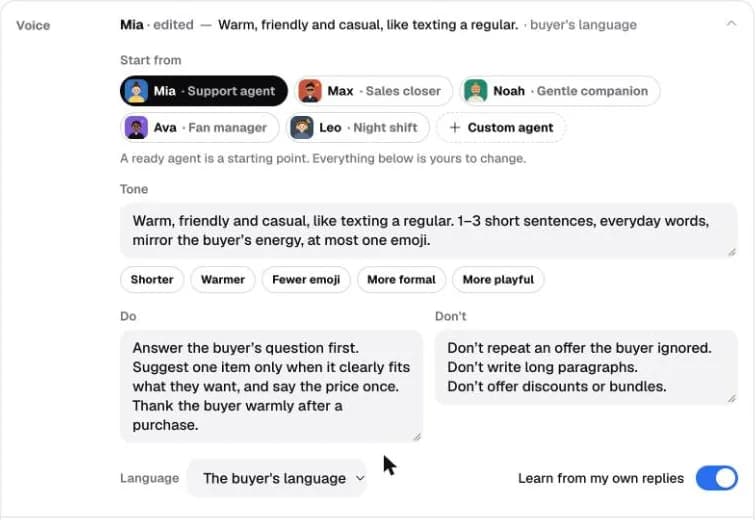
On the AI page, under How it replies, open the Voice row. It shows the current agent and the first line of its tone.
- Start from switches to another ready agent. The tone and the rules below change to match.
- The chips under Tone (Shorter, Warmer, Fewer emoji, More formal, More playful) each add a line to the tone text. You can also edit the text directly.
- Do and Don’t hold one rule per line. For example, in Don’t: “Never promise custom content.” The AI follows it in every reply.
- With several profiles, they share one voice. Pick a profile at the top and tap Give it its own voice to make it different.
Nothing changes in real chats until you save. The bar at the top counts your changes; press Save and the voice is live.
What buyers see
Replies go out from your Telegram account, under your name. On Autopilot the AI waits a few seconds so several messages in a row get one answer, shows “typing…”, and sends a longer reply as a few short messages, the way a person would.
Every setting here is described in the guide: The AI agent.
Questions
Does Telegram have a built-in auto reply?
Telegram Business has greeting and away messages, which send the same fixed text. To answer each message differently, you connect a chatbot to your account through Telegram Business.
Do I need Telegram Premium to connect a business chatbot?
No. Connecting a bot to your account doesn't require Telegram Premium. Setup takes about 5 minutes.
Will the AI reply without me?
Only on Autopilot, which unlocks after a checkup passes every safety test. In Drafts, the AI writes and you decide what to send.
How do I make the replies sound like me?
Open Voice on the AI page. Start from a ready agent, adjust the tone with the quick chips or your own words, and add Do and Don't rules. Save to make it live.
Can each Telegram profile have a different voice?
Yes. Profiles share one voice by default; pick a profile and tap Give it its own voice.
Which plan includes the AI?
Pro ($29/month) and Studio ($99/month). The free Start plan has the inbox and paid offers without AI.