How to accept Telegram Stars payments and get paid
Last verified November 8, 2026Why digital sales on Telegram are paid in Stars
Bots that sell digital goods inside Telegram take payment in Stars, Telegram’s in-app currency, because of Apple and Google app store rules. For you, that means no card form and no checkout page: the buyer taps a button, confirms, and the content unlocks.
With CreatorInbox you create the bot yourself in @BotFather and connect it to your Telegram account. Every payment goes to that bot. CreatorInbox never holds, withdraws or converts your Stars. How to set up paid offers is in How to sell digital products on Telegram.
1. Open Sales and pick a period
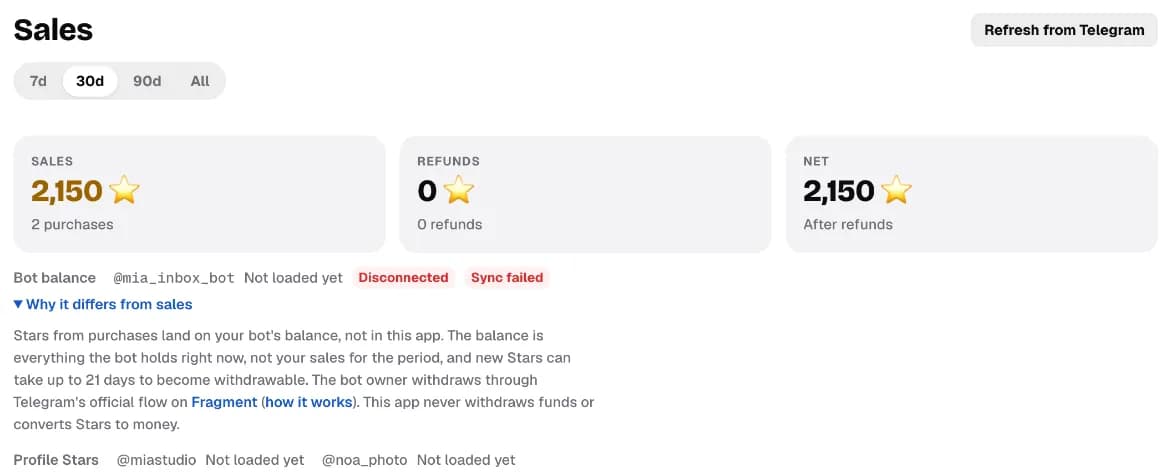
The switch at the top of Sales sets the time range: 7d, 30d, 90d or All.
2. Read Sales, Refunds and Net
Three cards sum up the period. Sales is what buyers paid, Refunds is what you gave back, and Net is what’s left after refunds. All three are in Stars.
3. Check your bot balance
Below the cards, the bot balance shows the Stars your bot holds right now. It won’t match your sales: the balance is everything the bot holds, while sales count only the period you picked. Tap Why it differs from sales for the short version.
4. Withdraw through Fragment when Stars are available
New Stars aren’t withdrawable straight away. The app currently says it can take up to 21 days; Telegram sets this period and can change it. When they’re available, the bot’s owner starts a withdrawal in Telegram, which opens Fragment, Telegram’s official platform for it. Telegram sets the rate and the minimum.
The full walkthrough is in Telegram Stars for creators. To see what a number of Stars is worth, use the Telegram Stars calculator.
5. Open a purchase, and refund if you need to
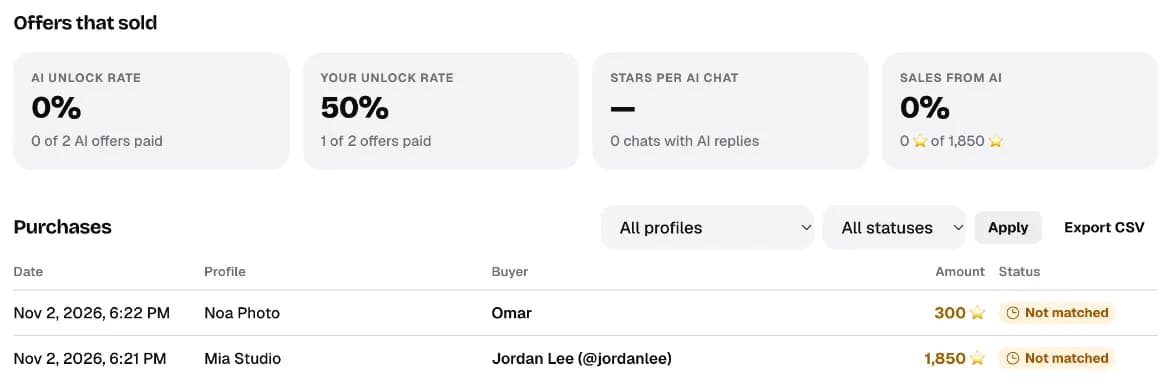
Open any purchase in the list to see when it was confirmed, which profile sold it, who bought it and what they got. The Refund Stars button is at the bottom. Once the payment is matched to Telegram, it sends the full amount back after you confirm, and the purchase shows Refunded.
6. Export your sales as CSV
Export CSV above the purchases gives you a file for your records or your accountant: date, profile, buyer, items, Stars, who made the sale (you, an AI draft or Autopilot), status and Telegram’s charge ID.
What CreatorInbox takes
| Plan | Your own sales | Sales the AI makes |
|---|---|---|
| Start | 5% | No AI |
| Pro | 0% | 12% |
| Studio | 0% | 7% |
Fees are charged to your card at the end of each billing period; your Stars stay on your bot. More in CreatorInbox pricing explained and the guide page Sales and getting paid.
Questions
Do I need a website to accept Telegram Stars?
No. A bot sends the payment request inside the chat and the buyer pays without leaving Telegram. CreatorInbox does this through a bot you own.
Does CreatorInbox hold my Stars?
No. Every payment lands on your own bot's Stars balance. CreatorInbox never holds, withdraws or converts them.
Why doesn't my bot balance match my sales?
The balance is everything the bot holds right now. Sales count only the period you picked, and refunds and withdrawals change the balance too.
How long until I can withdraw Stars?
The app currently says up to 21 days after each sale. Telegram sets this period and can change it, so check Telegram's own pages before planning around it.
Can I refund a buyer?
Yes. Open the purchase in Sales and tap Refund Stars. After you confirm, Telegram returns the full amount to the buyer.
How much are my Stars worth in dollars?
Telegram sets the withdrawal rate and can change it. Use the Telegram Stars calculator on this site for a current estimate.